
TL;DR. Power BI Embedded lets you put Power BI reports and dashboards inside your own app or portal, so people can view them without a Power BI Pro license and without a Microsoft account. You pay for a capacity (from a Fabric F2 upward), not per viewer, which is what makes it work at scale. It's a strong fit if you're already on Microsoft and you're comfortable running Azure resources. It gets harder when capacity costs start to swing, when you need full white-labeling, or when you don't want to build and maintain the embedding layer yourself. This guide covers what it is, how it works, what it really costs in 2026, the honest pros and cons, and where a platform like DataTako fits.
What is Power BI Embedded?
Power BI is an umbrella. It's a Windows desktop app (Power BI Desktop), an online service (Power BI Service on powerbi.com), a mobile app, and an embedding platform. Power BI Embedded is that last part: the set of tools that let you take a report you built in Power BI and show it inside your own application or portal instead of sending people to powerbi.com.
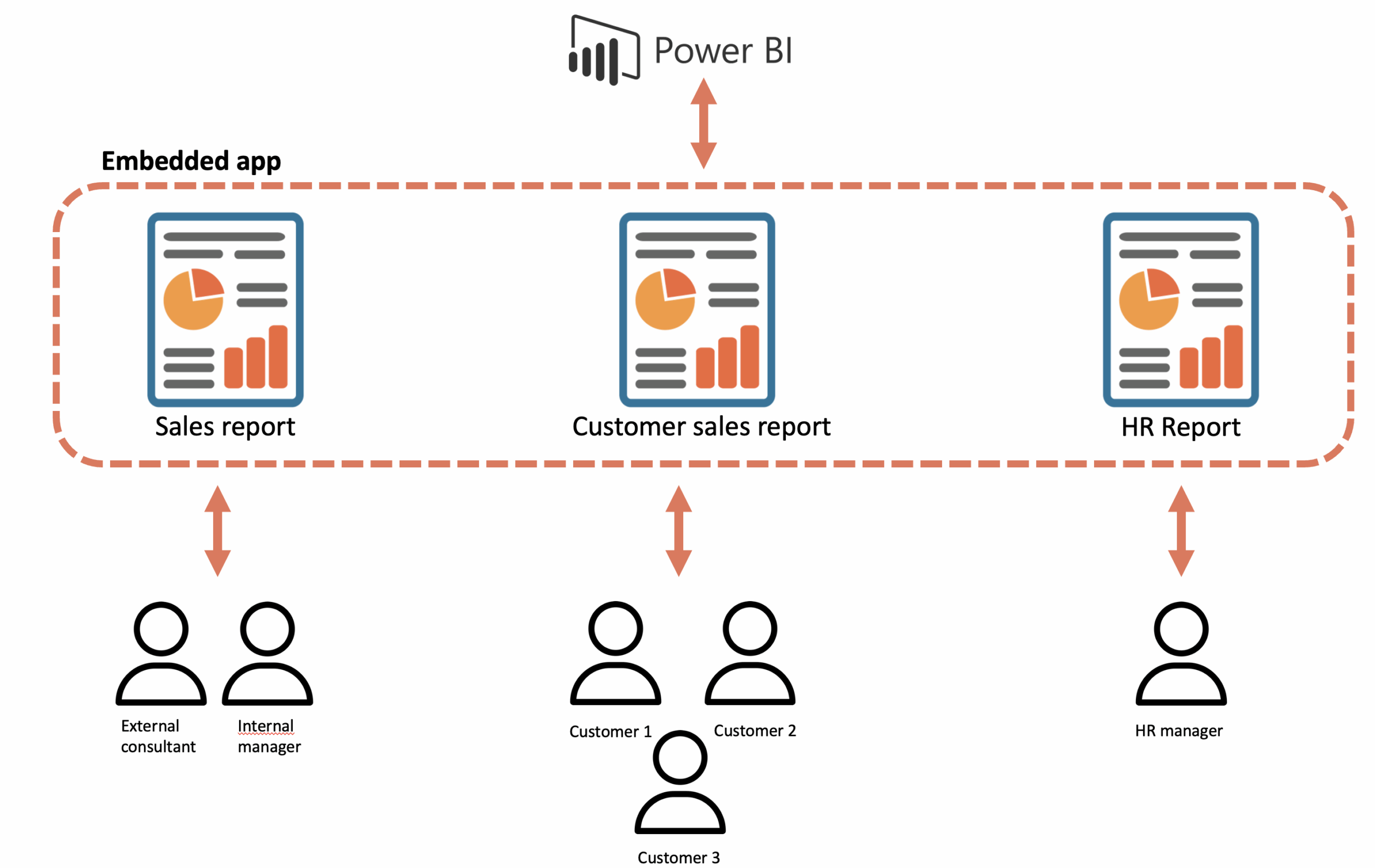
Microsoft's own definition is simple enough: embedded analytics lets you embed Power BI items such as reports, dashboards, and tiles in a web application or website.
The important thing most "what is" articles skip is that Embedded has two very different modes, and picking the wrong one causes most of the confusion:
- Embed for your customers ("app owns data"). Your app authenticates users, and Power BI never sees them directly. The viewers need no Microsoft account and no Power BI license. This is the mode for SaaS products, agencies, and anyone sharing with external people. It's also the mode DataTako is built on. We wrote a deeper piece on what "app owns data" means.
- Embed for your organization ("user owns data"). Your users sign in with their own Microsoft credentials. This is for internal apps where everyone already has a Power BI account.
If you're reading this because you want to share reports with clients or customers, you're almost certainly after the first mode.
How does Power BI Embedded actually work?
The default Power BI setup forces every viewer to log in to powerbi.com and understand workspaces, apps, datasets, and reports. Embedded puts your own application in front of all of that.
Here's the flow in the "app owns data" mode:
- You build your reports in Power BI Desktop and publish them to a workspace, exactly as you do today.
- That workspace is backed by a capacity (a Fabric F-SKU). The capacity is the compute you're paying for.
- Your app (or a platform like DataTako) uses a service principal and the Power BI REST API to generate an embed token for each viewer.
- The report renders inside your app under that token. The viewer sees the report. They never sign in to Power BI, and they never need a license.
- If you've set up row-level security (RLS), the token carries the viewer's data scope, so each person only sees their own rows.
Two things follow from this. First, the embedding layer (tokens, refresh logic, capacity, RLS wiring) is real engineering work that someone has to own. Second, your backend always talks to Azure to authenticate and serve the content, so you stay inside Microsoft's environment. That's a strength if you're already there, and a constraint if you're not.
Who is Power BI Embedded for?
It's the natural choice for teams already standardized on Microsoft: Azure infrastructure, Power BI Desktop, Entra ID for authentication. If your reports already live in Power BI, Embedded lets you extend them to external users without rebuilding anything.
In practice, the people reaching for it are:
- SaaS and ISV teams adding customer-facing analytics inside their product.
- BI and marketing agencies delivering client reporting portals, where each client sees only their own data.
- Internal platforms that want operational dashboards inside the tools teams already use.
What they have in common: a lot of viewers, and no appetite for buying every one of them a Pro license.

What does Power BI Embedded cost in 2026?
This is where a lot of older articles are simply out of date, because they still quote the legacy Azure A-SKUs. In 2026 the recommended path is Fabric F-SKU capacities, and you can start as low as an F2.
The model is capacity-based, not per user. You pay for the capacity and the licenses of the people who build reports, not the people who view them:
- A Fabric F2 capacity: around €263/month.
- Pro licenses for your report creators: around €12.10 each per month (you only need these for the handful of people building reports).
- Viewers: €0. No Pro, no Microsoft account, no per-seat cost.
Compare that to the classic Pro-only setup, where 90 viewers at roughly €12.10 each is close to €950/month just for people to look at a dashboard. The more viewers you add, the wider the gap gets, because capacity cost doesn't move when viewers go up. That's the whole economic argument for Embedded.
The honest catch: capacity is a compute bill, and compute can swing with usage. If you leave a capacity running 24/7 you pay for hours nobody's using. (More on that below, and it's exactly why we built auto pause into DataTako.) You can model your own numbers with our cost calculator, and there's a deeper breakdown in our complete Power BI Embedded pricing guide.
The honest pros
Power BI Embedded earned its popularity for good reasons:
- No viewer licenses. The single biggest win. You share with unlimited external users without buying anyone a Pro license.
- Your reports, unchanged. You keep building in Power BI Desktop with DAX and Power Query. Nothing gets rebuilt.
- Wide data connectivity. Hundreds of connectors, from on-prem SQL to Azure to Salesforce and Google Analytics.
- RLS built in. Row-level security lets one report serve many customers, each seeing only their rows.
- Enterprise security and compliance. It inherits Azure's security posture, which matters in finance, healthcare, and the public sector.
- Monthly updates. Microsoft ships improvements every month without you patching anything.
The honest cons (where teams hit limits)
No tool is a perfect fit, and this is the section most vendor articles quietly skip. Here's where Power BI Embedded gets hard.
- Capacity pricing can be unpredictable. You're paying for compute. Costs are fine at steady usage, but they climb when data grows or usage spikes, and a capacity left running around the clock burns money on idle hours.
- No full white-labeling out of the box. You can adjust some branding, but the raw Embedded experience still carries Power BI's design patterns. Getting a portal that genuinely feels like your product takes extra work.
- Self-service isn't included. Embedded is built for viewing prebuilt reports. The moment you want viewers to build or edit their own reports, you're back to needing Pro licenses and Power BI Service access.
- You have to build and maintain the embedding layer. Token generation, refresh logic, multi-tenant RLS, capacity monitoring, error handling. This is commonly four to six months of engineering for a production-ready, multi-tenant, branded portal, and it never fully stops, because tokens expire and APIs change.
- Microsoft dependency. Your backend always talks to Azure. If you're on AWS or GCP, or you want to stay infrastructure-agnostic, that's friction.
None of these means Embedded is wrong. They mean Embedded is an engine, not a finished product. The question is who builds the rest of the car.
Power BI Embedded vs the other sharing options
Quick orientation, because these get mixed up constantly:
- Power BI Pro: per-user licensing. Fine internally, breaks down financially past 30 to 50 external viewers.
- Power BI Premium (per capacity): a heavier capacity model aimed at large internal deployments, not external sharing economics.
- Publish to web: genuinely public, no security. Marketing content only, never customer data.
- Power BI Embedded: capacity-based, no viewer licenses, secure, brandable. The right tool for external sharing at scale.
We go deep on the trade-offs in Power BI Embedded vs Pro vs Premium.
When Power BI Embedded is the right fit, and where DataTako comes in
Power BI Embedded is the right foundation when you're on Microsoft, you have real viewer volume, and you want to keep your reports in Power BI. That part is settled.
The open question is build versus buy on everything around the engine: the branded portal people actually log into, multi-tenant user management, RLS wired to your customer identities, capacity that pauses when nobody's working, audit logs a compliance team can use. Build it yourself and you're looking at those four-to-six months of engineering, plus ongoing maintenance.
That's the gap DataTako fills. We're built on top of Power BI Embedded, so your reports, models, and data stay exactly where they are in Microsoft's ecosystem. We handle the layer between the engine and your users:
- A white-label portal on your own domain, your logo, your colors, no Microsoft or DataTako branding anywhere.
- Multi-tenant RLS and user management without you administering Entra ID.
- Auto pause and resume on your Fabric capacity, which is how teams cut that idle-hours compute cost by up to 70%.
- Viewer-level audit logs and compliance reporting.
Teams that would have spent months building this into their product are sharing branded reports within about ten minutes of signing up. We're not replacing Power BI. We're the delivery layer on top of it.
Frequently asked questions
Do viewers need a Power BI Pro license? No. With the "app owns data" (embed for your customers) mode, viewers need no Pro license and no Microsoft account. You only license the people who build reports.
Can I share Power BI reports with users who don't have a Microsoft account? Yes, through Power BI Embedded's app-owns-data mode. Your app authenticates the user and Power BI never sees them, so no Microsoft account is required.
How much does Power BI Embedded cost in 2026?It's capacity-based. A Fabric F2 starts around €263/month, plus roughly €12.10/month per report creator. Viewers are free. Actual cost depends on your capacity size and how long it runs, which is why auto-pause matters.
What's the difference between "embed for your customers" and "embed for your organization"? "Embed for your customers" (app owns data) is for external users with no Microsoft account. "Embed for your organization" (user owns data) is for internal users who sign in with their own Microsoft credentials.
Do I need a Fabric capacity to start? Not immediately. Microsoft offers trial tokens you can use for months before committing, and DataTako works with any Fabric or Embedded capacity, down to an F2 SKU.
Is Power BI Embedded the same as Power BI Premium? No. Premium is a capacity model aimed mainly at large internal deployments. Embedded is built for embedding analytics into your own app or portal, with the app-owns-data path for external users.
How long does it take to set up? Building the embedding layer yourself is typically four to six months for a production, multi-tenant, branded portal. On a ready-made platform like DataTako it's minutes to a working portal, because the embedding, branding, and security are already handled.
Next step
If you want to see what this looks like without building anything, book a demo or start a free trial. Want the numbers for your own setup first? Run them through the cost calculator, or download our 17-page guide, Scaling Power BI to External Users.

