

If you're building a multi-tenant SaaS or agency portal on top of Power BI Embedded, row-level security (RLS) is the single most important architectural decision you'll make. Get it right and one Power BI dataset can serve hundreds of clients with their data perfectly isolated. Get it wrong and Acme Corp sees Beta Corp's revenue figures and you have a breach notification to send.
This guide walks through how multi-tenant RLS actually works on Power BI Embedded in 2026: the standard pattern, the static-vs-dynamic decision, concrete implementation steps, the seven pitfalls that trip up almost every team, and when to skip RLS entirely in favour of a different isolation model.
TL;DR — the multi-tenant RLS pattern in 60 seconds
What RLS is, in plain English
Row-level security in Power BI is a feature that filters the rows a particular user can see at query time. You define roles on the dataset (e.g. "Customer", "Internal Admin"), each role has a DAX filter expression that says which rows are visible to members of that role, and at render time the embed token tells Power BI which role and which user this session represents. Power BI rewrites every query that runs on the dataset to include the filter automatically.
Crucially: RLS happens after data is loaded into the dataset. The dataset itself contains every row from every tenant — RLS just controls which rows surface to whom. This is fine for almost every use case but it means RLS isn't a substitute for physical data segregation when you have regulatory requirements that demand it (e.g. some healthcare or defence contracts).
The standard multi-tenant pattern
Here's the architecture that works for 99% of multi-tenant SaaS or agency-client scenarios:
1. One dataset, one workspace
Build one Power BI dataset that contains data for all your tenants. Every fact table includes a tenant_id (or customer_id, agency_id, workspace_id — pick a name and stick to it everywhere) column. Dimension tables either include the same column or are universal across tenants (e.g. a Calendar dimension is shared).
One workspace on a Fabric capacity hosts the dataset and the reports. Reports are designed once. New tenants don't require new content — just a new row in your tenant lookup table.
2. Dynamic RLS via a Tenant role
In Power BI Desktop → Modeling → Manage Roles, create a role called Tenant with this DAX filter on every fact table that contains tenant-specific data:
[tenant_id] = LOOKUPVALUE(Users[tenant_id], Users[email], USERPRINCIPALNAME())
Or, if your embed tokens pass a custom identity rather than email, swap USERPRINCIPALNAME() for the column you use as the identifier. The point: the role filters every fact table to rows where tenant_id matches the current user's tenant.
You'll want a separate Users dimension table in the dataset that maps user identifiers (or just tenant identifiers, if your app passes tenant IDs directly) to tenant IDs. This lookup happens server-side at query time and is fast as long as the table is sensibly sized and well-indexed.
3. App-owns-data embedding with a service principal
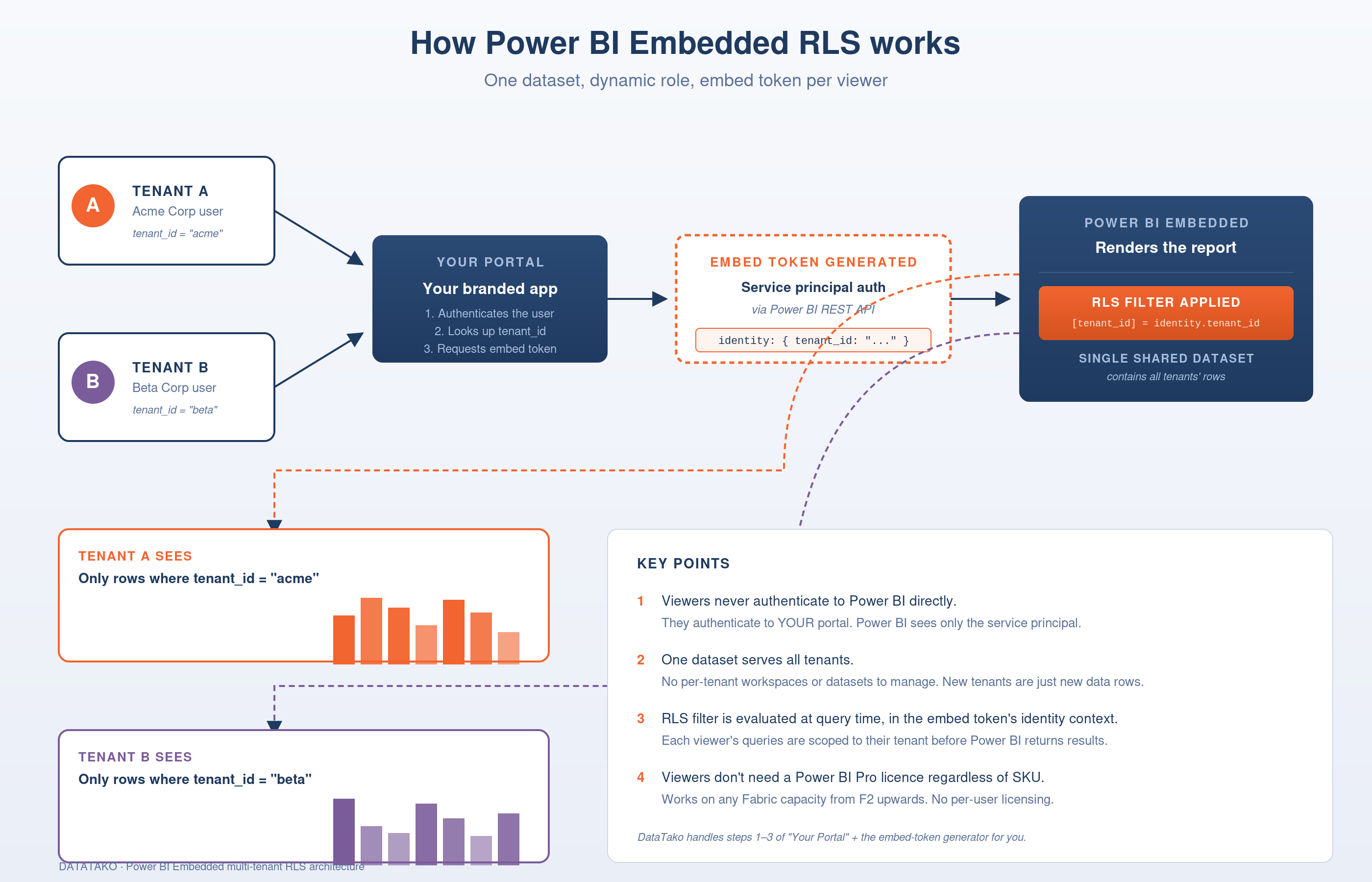
Your app authenticates to Power BI using a service principal (an Entra app registration with the necessary Power BI permissions), not as individual users. When a viewer in your portal opens a report, your backend:
Power BI receives the token, knows which role to apply, executes the RLS filter, and the viewer sees only their tenant's data. They never authenticate to Power BI directly. They never know Power BI is involved.
4. Tenant data flow into the dataset
Your data pipeline writes tenant-stamped rows into whatever upstream warehouse your Power BI dataset reads from (a Fabric lakehouse, an Azure SQL database, a Snowflake share, etc.). Refreshes happen on the dataset as a whole. Adding a new tenant means writing new rows with the new tenant_id and adding the tenant to your Users lookup table. No new Power BI artefact required.
Static RLS vs dynamic RLS — when each fits
Static RLS means you create one role per tenant, each with a hard-coded DAX filter like [tenant_id] = "acme". The embed token specifies which role applies. Simple but doesn't scale — you have to create a new role in the dataset every time a new tenant signs up, which means redeploying the dataset.
Use static RLS only if you have a small fixed set of tenants (say <10) that change rarely. For anything that scales, use dynamic RLS.
Dynamic RLS uses one role whose DAX filter resolves the tenant at query time based on the effective identity in the embed token. New tenants don't require dataset changes — just data and a Users row. This is the right pattern for SaaS.
Seven RLS pitfalls that trip up almost every team
1. Forgetting to filter every fact table
If your dataset has multiple fact tables (Orders, Events, Invoices, etc.) and RLS only filters some of them, the unfiltered tables leak. Make sure every fact table either has the RLS filter directly, or is filtered transitively through a relationship to a filtered table. Test this by impersonating a tenant role and running queries that touch every visual.
2. Bidirectional relationships breaking RLS
Bidirectional cross-filter relationships can short-circuit RLS in subtle ways. The safest model is single-direction relationships from dimensions to facts. If you genuinely need a bidirectional relationship, double-check the security boundary by impersonating a tenant role and verifying no leakage.
3. Calculated tables that aggregate across tenants
A calculated table built in DAX with SUMMARIZE or similar across the full dataset may store aggregates from all tenants. If a tenant can query that calculated table, they see global aggregates. Either move the calculation into measures (which respect RLS at query time) or filter the calculated table by tenant explicitly.
4. The "All" or "No Filter" gotcha
If a tenant lookup misses (e.g. a new user not yet added to your Users table), the LOOKUPVALUE returns blank, which means the filter [tenant_id] = BLANK() returns nothing — the user sees an empty report. That's safer than seeing everyone else's data, but it's also confusing. Detect this case in your backend and either provision the user automatically or show a friendly "your account isn't fully provisioned yet" page.
5. Performance on large fact tables
RLS filters are SQL WHERE clauses. If the tenant_id column on a 100M-row fact table isn't indexed (or, in Power BI's columnstore terms, doesn't have good cardinality compression), every query incurs a full scan. Test with realistic data volumes. If you're on Direct Query, this matters most.
6. Embed token expiry mid-session
Embed tokens have a maximum lifetime (typically 1 hour for app-owns-data tokens). If a viewer leaves a report open for two hours and then clicks a slicer, the request fails with a 403. Refresh tokens proactively in your frontend — listen for the token-expiring event from the Power BI Embedded JS SDK and fetch a new token from your backend before the old one dies.
7. RLS roles ignored in Direct Query DAX
RLS is enforced in import mode and in Direct Query, but composite models can introduce edge cases where DAX-defined RLS gets bypassed if a Direct Query source has its own RLS expression. Stick to one RLS layer per dataset — either Power BI RLS or database-level RLS, not both.
Power BI Embedded multi-tenant: alternatives to RLS
RLS isn't the only multi-tenant pattern. Here are the alternatives and when they fit:
Workspace per tenant
Every tenant gets their own Power BI workspace. Reports and datasets are duplicated. Works fine up to ~10-20 tenants — past that it becomes a deployment and maintenance nightmare. Avoid for SaaS.
Dataset per tenant in shared workspace
One workspace, one dataset per tenant. Less management overhead than workspace-per-tenant but you're still building N copies of the same model. Some teams use this when regulatory requirements demand physical data separation. Acceptable for B2B with <50 tenants and serious compliance constraints.
Tenant in URL parameter, no RLS
Don't do this. Passing tenant identifiers via URL parameter or query string with no server-side enforcement is broken from a security standpoint — any user can change the parameter and see another tenant's data. Yes, real implementations have shipped this. Don't be one of them.
Database-level row security (without Power BI RLS)
If your Power BI dataset is Direct Query against Azure SQL or similar, you can enforce row-level security at the database layer using session context, and Power BI just renders whatever the database returns. Single source of truth for security. Works well if all your dashboards are Direct Query. Doesn't work for Import mode datasets — those need Power BI RLS.
Without writing code — DataTako and similar platforms
Building the RLS layer, the service principal flow, the embed token generation, the token refresh logic, and the tenant-to-role mapping is real engineering work. Plan on 2-4 weeks for a competent backend engineer to get to a production-grade basic implementation.
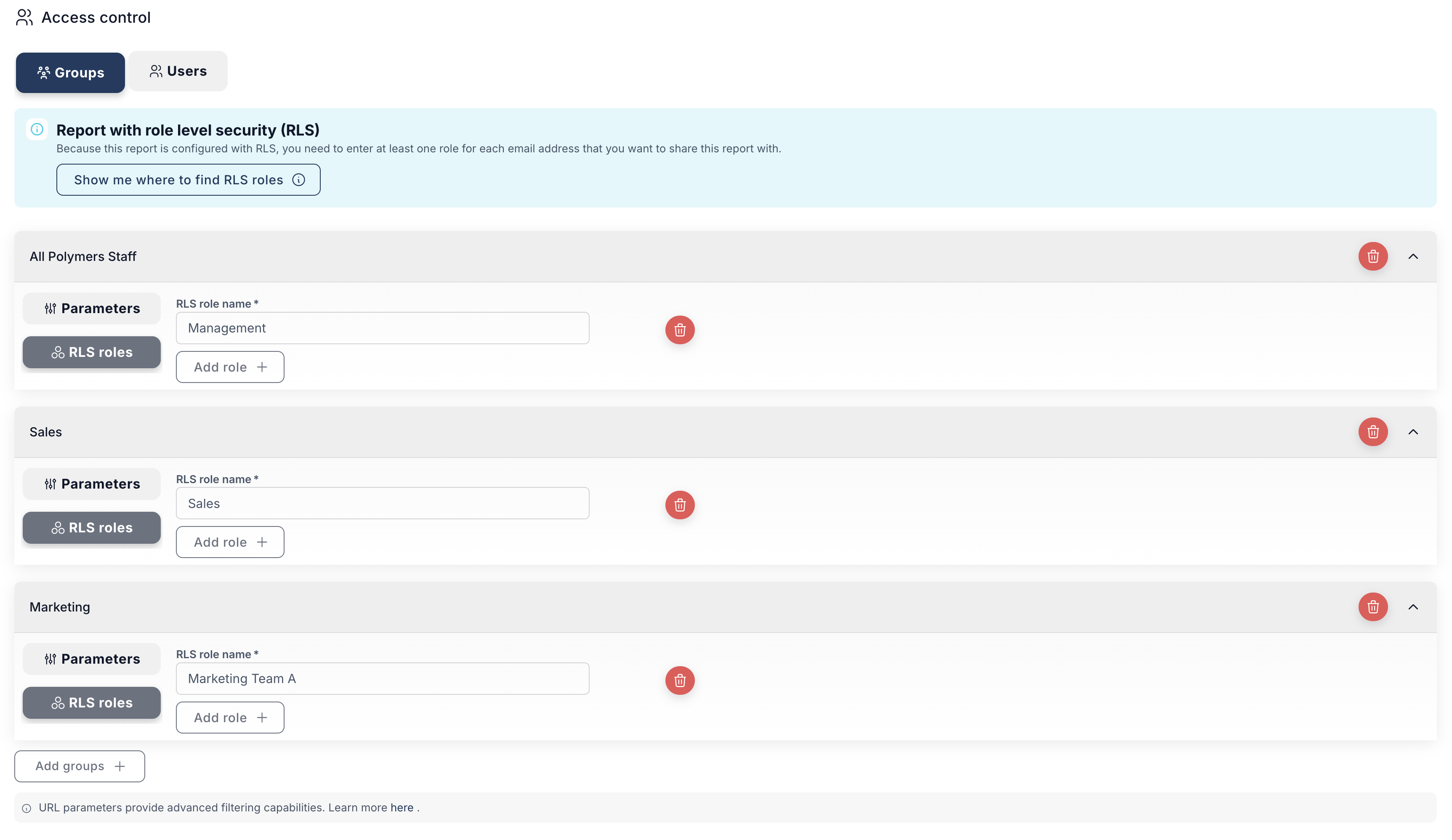
If you'd rather configure than code, no-code white-label platforms handle this end-to-end. With DataTako:
This is the same architecture under the hood. A service principal, app-owns-data, dynamic RLS, but the implementation is configuration, not code. For most agencies and SaaS teams the engineering time saved is more valuable than the marginal customisation lost.
Frequently asked questions
What is RLS in Power BI Embedded?
Row-level security (RLS) is a Power BI feature that filters which rows of a dataset a user can see, based on a DAX expression evaluated at query time. In an embedded context, the embed token tells Power BI which RLS role to apply, so each viewer sees only their tenant's data even though the underlying dataset contains data for all tenants.
Does Power BI Embedded support row-level security?
Yes — both static and dynamic RLS work in app-owns-data and user-owns-data embedded scenarios. The embed token API includes a roles array and an identities object that you populate at token generation time.
How do I implement multi-tenant Power BI Embedded?
The standard pattern: one dataset with a tenant_id column on every fact table, one dynamic RLS role that filters by the current user's tenant_id, a service principal that authenticates to Power BI on behalf of all viewers, and embed tokens generated per session with the effective identity set to either the viewer's username or directly to their tenant_id.
Can I have unlimited tenants on one Power BI dataset?
Practically, yes. The limits are dataset size (100GB on F64+ capacities, less on smaller ones) and query performance, not the number of tenants. The largest production deployments we've seen run thousands of tenants on a single dataset without issue. The bottleneck is usually data volume per tenant, not tenant count.
Power BI Embedded RLS vs database RLS — which should I use?
If your dataset is Import mode (most are), use Power BI RLS — the database layer doesn't see queries from Import datasets. If your dataset is Direct Query and you already have row-level security at the database (e.g. Azure SQL session context), you can rely on that and not define Power BI RLS at all. Don't define both — they can conflict.
What capacity do I need for multi-tenant Power BI Embedded?
Power BI Embedded works on any Fabric F-SKU including F2 (~$263/month) for small workloads. The capacity sizing depends on concurrent query load and refresh frequency, not tenant count directly. Most multi-tenant SaaS implementations start at F8 (~$1,050/month) and right-size from the Capacity Metrics report after two weeks of real load. Full Fabric capacity guide covers sizing in detail.
Do embedded viewers need a Power BI Pro licence?
No. In app-owns-data embedded (the multi-tenant SaaS pattern), the service principal authenticates to Power BI, not the individual viewer. Viewers never need a Power BI Pro, PPU, or Fabric licence regardless of the SKU size. This is why embedded is so much cheaper than per-user Power BI sharing at scale.
How do I prevent one tenant from seeing another tenant's data?
Three things, in order of importance: (1) RLS filters on every fact table that contains tenant-specific data, (2) test impersonation thoroughly — sign in as a tenant role and run every report visual, (3) treat any client-side tenant identifier as untrusted and re-validate on the server before generating an embed token.
Can RLS slow down Power BI reports?
Yes, if poorly implemented. The DAX filter adds a query-time predicate that the engine has to evaluate. On well-modelled datasets with sensibly-sized dimension tables, the overhead is negligible. On poorly-modelled datasets with many-to-many bridges, calculated tables, or unindexed tenant columns, it can be significant. Test with realistic data volumes before going live.
What's the difference between RLS and OLS in Power BI Embedded?
Row-Level Security filters rows. Object-Level Security (OLS) hides entire tables or columns from specific roles — so for example, a "Customer" role might see the Orders table but not the Margin column. Both work in embedded. OLS is useful when different tenant tiers should see different fields, not just different rows.
How do I test RLS in Power BI Embedded?
In Power BI Desktop, Modeling → View As → choose the role and (for dynamic RLS) enter the user identifier you want to impersonate. The model behaves as if that user is viewing. In the embedded context, you can also generate an embed token with a specific identity and load the report in a test page to verify what the viewer actually sees.
Can DataTako handle multi-tenant RLS for me?
Yes. DataTako takes the tenant-to-user mapping from your existing system (via UI configuration or API) and generates the appropriate embed tokens with the right effective identity for each viewer. The RLS itself still lives in your Power BI dataset. DataTako handles the auth, token generation, and tenant lookup so you don't have to build that layer yourself.
Pulling it together
Multi-tenant Power BI Embedded with dynamic RLS is the standard pattern for SaaS analytics in 2026, and it scales effortlessly to thousands of tenants on a single dataset. The architecture is well-understood, well-supported by Microsoft, and proven across hundreds of production deployments.
The build-vs-buy question for the embedding layer (token generation, tenant mapping, branded portal) is a different decision — and it's the one that tends to consume the most engineering time. If your team's analytics roadmap is going to be a major investment, building it yourself makes sense. If analytics is one feature among many and you'd rather ship faster, a no-code embedded platform like DataTako closes the time-to-live gap from weeks to hours.
Start a free trial on your existing Power BI workspace, or book a 30-minute walkthrough to see multi-tenant RLS configured live.